Understanding Circuit Diagrams: Basics and Symbols
A beginner-friendly guide to digital logic circuits. Learn about AND, OR, NOT, NAND, NOR, and XOR gates, truth tables, and how to build common circuits like adders and multiplexers.
The first digital circuit I ever built in college was a seven-segment LED decoder. It took me about six hours, and two of those were spent staring at a NAND gate wondering why the output was always high. I'd wired the ground to the wrong pin. No textbook had warned me about that — because textbooks show you the diagram, not the debugging.
That's the gap this article tries to fill. I'll cover the basic logic gates and symbols every beginner needs, but I want to also give you the intuitions that only come from actually building circuits: which gates you'll use daily, which ones are mostly academic trivia, and the subtle conventions that trip up everyone at least once.
Why learn this at all?
Digital logic is the bottom floor of computing. Every abstraction above it — machine code, programming languages, frameworks — is built on gates that switch between 0 and 1. You don't need to know this to write a React app, obviously. But the moment you care about performance, embedded systems, FPGAs, or even why floating-point arithmetic behaves strangely, this is the layer the answers live in.
It's also surprisingly useful for general engineering intuition. Truth tables are the clearest way to specify branching behavior, and a lot of business logic (“send the reminder if X and not Y and either A or B”) is really a Boolean expression hiding in prose.
The logic gates, ranked by how often you'll see them
Most introductory material treats all six gates as equals. In practice they are not. Here they are in rough order of real-world usefulness, with the intuition that made each click for me.
AND — the “both must be true” gate
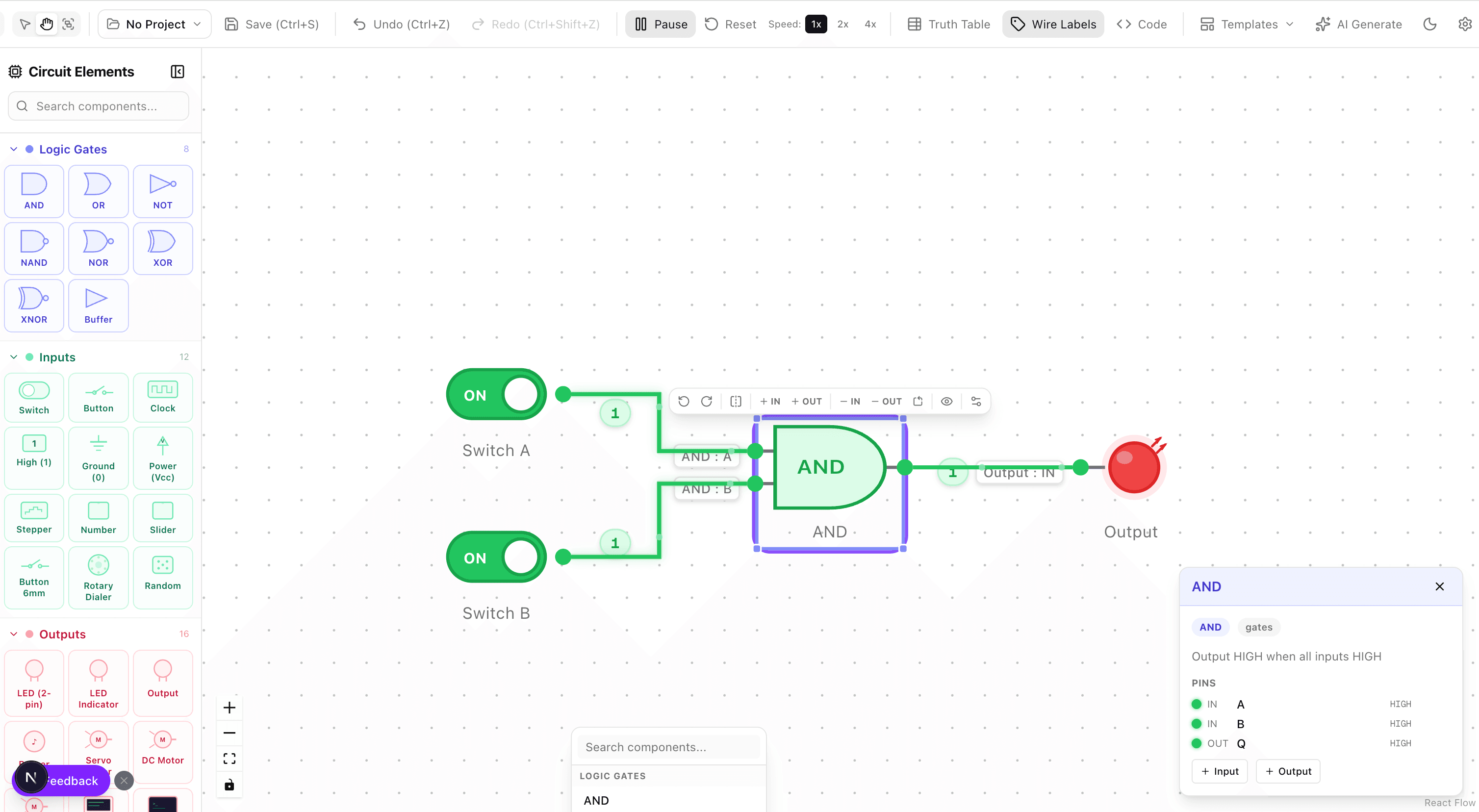
Output is 1 only when all inputs are 1. The mental model is a series circuit with two switches — current flows only if both switches are closed.
You'll reach for AND any time you need a guard condition: “allow transaction if user is authenticated AND amount is below limit AND account is not frozen.” Three AND gates chained together, done.
OR — the “at least one” gate
Output is 1 when any input is 1. The parallel-switch counterpart to AND — current flows if either switch is closed. Useful any time multiple independent conditions can trigger the same action: “alert on fire OR smoke OR high temperature.”
NOT — the inverter
Single input, output flipped. Trivial in isolation. Where it earns its keep is in combination — NOT plus AND gives you NAND, NOT plus OR gives you NOR, and those two gates can build everything else. The “bubble” notation (a small circle on a gate's input or output) is a NOT baked in; a bubble on an AND output is just a NAND.
XOR — the “different” gate
Output is 1 when inputs differ, 0 when they match. Less intuitive than AND/OR but absolutely everywhere in practice. XOR is how addition works in binary (sum bit of a half adder). It's the backbone of parity bits, checksums, RAID 5 error correction, and — famously — the cipher in one-time-pad encryption, because XOR is its own inverse (a XOR k XOR k = a).
NAND — the universal gate
AND followed by NOT. Output is 0 only when all inputs are 1. The magic fact about NAND is that it is functionally complete — you can build AND, OR, NOT, XOR, and every other logic gate using only NAND gates. This is why CMOS chip fabrication leans so heavily on NAND; it's physically cheaper to manufacture than the alternatives. NOR has the same property for the same reason, which is why the Apollo Guidance Computer used only NOR gates.
NOR — the other universal
OR followed by NOT. Output is 1 only when all inputs are 0. In practice you'll encounter NOR less often than NAND in modern designs, mostly for implementation reasons in silicon. For learning purposes they're interchangeable: anything you can build with one, you can build with the other.
Truth tables: the source of truth
A truth table lists every possible combination of inputs and the corresponding output. For n inputs, you have 2^n rows. For two inputs, four rows; for three, eight; for four, sixteen. Beyond four inputs, truth tables get unwieldy and Karnaugh maps or Boolean algebra take over.
The workflow I learned and still use: write the truth table first, derive the logic from it. Given a specification like “the alarm fires if the door is open and it's after hours, or if motion is detected while armed,” you fill in the truth table directly from the prose, then simplify. This is harder to get wrong than trying to build the gate network straight from the description.
Two-input AND truth table:
The output column is the signature of the gate. Any gate is defined entirely by which rows produce a 1. Two gates with the same output column are the same gate, regardless of how they're drawn.
Building blocks worth memorizing
Once you can read gate diagrams, certain combinations appear over and over. Recognizing them is the difference between tracing wires for ten minutes and going “oh, that's a full adder, skip it.”
Half adder
Two inputs (A, B), two outputs (sum, carry). The sum is A XOR B. The carry is A AND B. That's it. Binary addition of a single bit pair. Every adder you'll ever see is built from this.
Full adder
A half adder with a carry-in from the previous bit, so three inputs (A, B, Cin) and two outputs (sum, Cout). Chain n full adders and you can add two n-bit numbers. This is — literally — how your CPU's ALU works when you write a + b. The ripple carry has to propagate through every stage, which is why faster designs like carry-lookahead adders exist.
Multiplexer (MUX)
A selector. An N-to-1 MUX takes N data inputs, log2(N) select lines, and outputs whichever data input the selector points at. This is the hardware version of a switch statement. Used everywhere inside CPUs to route data between functional units.
Flip-flop
The transition from combinational to sequential logic. A combinational circuit's output depends only on current inputs. A flip-flop has memory — its output depends on previous inputs too. One flip-flop stores one bit. Chain them into registers, stack registers into RAM, and you have state. This is where “it's just gates all the way down” starts feeling true.
Reading conventions that trip up beginners
- Signal flow is left to right. Inputs on the left, outputs on the right. Any diagram that violates this should be redrawn.
- A dot at a wire junction means connection. Wires that cross without a dot are not connected — they just overlap visually. This convention trips up everyone at least once, usually when debugging a circuit that won't work.
- Bubbles are NOTs. A small circle on any gate input or output negates that signal. An AND with a bubble on the output is a NAND. An AND with bubbles on both inputs is equivalent to a NOR (De Morgan's law in graphical form).
- Gate shape encodes function. Flat input side + curved output = AND family. Curved input side = OR family. Triangle = buffer or NOT. Learn these four silhouettes and you can read most diagrams without labels.
- Signal names carry meaning. Inputs named A, B are generic. Inputs named “clk”, “rst”, “en” are clock, reset, enable — each with expected timing behavior. Don't ignore them.
From diagram to working circuit
A static diagram is a specification. Getting confident with digital logic requires actually running signals through it. An interactive simulator lets you toggle each input and watch the output flip, which is how the truth table goes from memorized to internalized.
Our browser-based circuit simulator exists for this reason. Drop in gates, connect them, flip the input switches and watch the LEDs light up. The moment you build your first XOR from four NANDs and see the output match the truth table you wrote down, digital logic stops feeling abstract.
If you're designing circuits as part of a broader system (say, documenting a CPU architecture), you'll likely also want block-level diagrams alongside the gate-level ones. The principles in our guide to architecture diagrams apply — pick a level of abstraction and stick to it.
Habits that produce clean designs
- Simplify before building. Use Boolean algebra or a Karnaugh map to minimize gate count before wiring anything. Fewer gates means fewer failure points, less power draw, less propagation delay.
- Reuse building blocks. Don't rebuild an adder from gates every time you need to add. Treat adders, muxes, decoders as modules and compose them.
- Test a sub-circuit in isolation before integrating. Same principle as unit testing. A bug in a full adder is much easier to find than a bug in a 32-bit ALU.
- Document with truth tables. The truth table is the unambiguous spec. The diagram can be redrawn a dozen ways; the truth table is the same regardless.
- Label every signal, including intermediates. Six months later you'll need them to debug.
Where this takes you
Understanding gate-level logic is the gateway drug to a stack of increasingly powerful topics: FPGA design, computer architecture, digital signal processing, embedded systems, hardware security. You don't need to master all of it. But even a working intuition for how a CPU physically adds two numbers changes how you think about software performance.
The next natural step after gates is the instruction set architecture that sits above them — how a sequence of gates becomes a CPU that runs machine code. That's a much larger topic, and one where simulation matters even more than at the gate level.
Try it yourself
Create diagrams instantly with AI Diagram — describe what you need and get a professional diagram in seconds.
Open Diagram EditorBuilder of CalcStack. Writes about software architecture, AI-assisted diagramming, and developer productivity. Follow on awais.calcstack.co.
Related articles